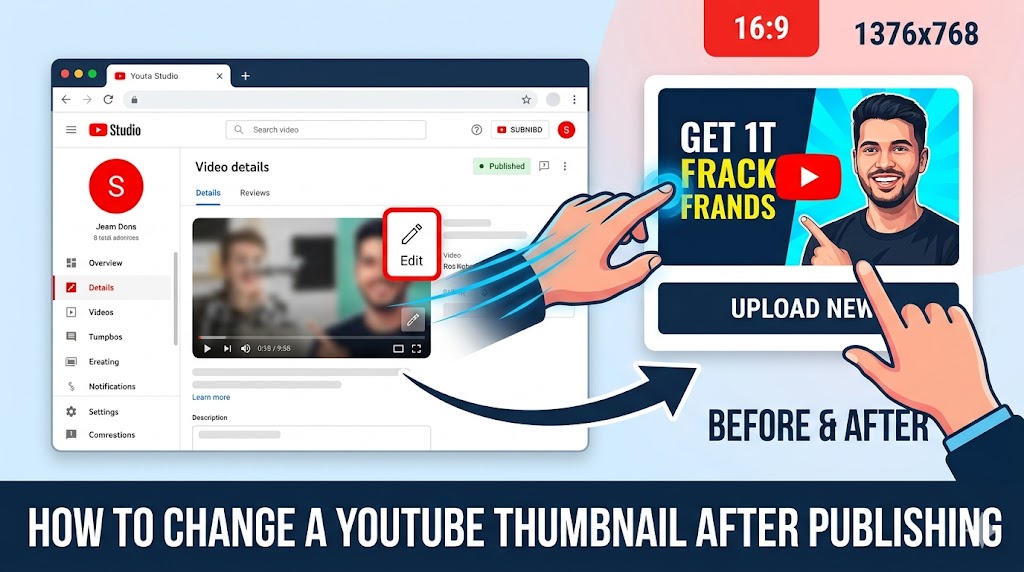
Uploading a video is only the beginning of your YouTube optimization journey. Many creators later realize they need to change youtube thumbnail after upload because the original image is not getting enough clicks or engagement. Fortunately, YouTube allows creators to update thumbnails even after a video is published. Whether you want to improve click-through rate, refresh old content, or fix branding mistakes, learning how to change youtube thumbnail after upload can significantly improve video performance and audience engagement.
Why Creators Change YouTube Thumbnail After Upload
There are many reasons creators decide to change youtube thumbnail after upload.
Improving Click-Through Rates
A weak thumbnail can reduce visibility and viewer interest.
Refreshing Older Videos
Updated thumbnails can make older videos feel new again.
Fixing Branding Problems
Creators often improve consistency by redesigning thumbnails.
- Better typography
- Stronger colors
- Improved facial expressions
- More modern layouts
These improvements explain why many creators regularly change youtube thumbnail after upload.
Tip: Updating thumbnails on older videos can sometimes revive views and improve recommendation performance.
How to Change YouTube Thumbnail After Upload on Desktop
Using YouTube Studio on desktop is the easiest way to change youtube thumbnail after upload.
Step 1: Open YouTube Studio
Log into your YouTube account and open YouTube Studio.
Step 2: Select Content
Go to the “Content” section to view your uploaded videos.
Step 3: Choose the Video
Click the video you want to edit.
Step 4: Update YouTube Thumbnail
Under the thumbnail section, upload your new image.
Step 5: Save Changes
Click “Save” to apply the updated thumbnail.
This process allows creators to easily update youtube thumbnail settings whenever needed.
How to Change YouTube Thumbnail After Upload on Mobile
You can also change youtube thumbnail after upload using the YouTube Studio mobile app.
Open the YouTube Studio App
Install and launch the app on Android or iPhone.
Select the Video
Navigate to your content dashboard.
Edit YouTube Thumbnail
Tap the pencil icon and upload a replacement image.
Save the Changes
Confirm your edits to apply the updated thumbnail.
Mobile editing makes it easy to edit youtube thumbnail settings from anywhere.
Special Attention: Always use high-resolution thumbnails to avoid blurry previews on mobile devices.
YouTube Thumbnail Settings You Should Know
Understanding youtube thumbnail settings helps creators optimize their videos more effectively.
Recommended Thumbnail Size
- 1280 x 720 pixels
- 16:9 aspect ratio
- Under 2MB file size
Supported File Types
- JPG
- PNG
- GIF
Verification Requirements
YouTube requires verified accounts for custom thumbnails.
Proper youtube thumbnail settings improve image quality and compatibility.
When Should You Replace YouTube Thumbnail?
Knowing when to replace youtube thumbnail designs can improve channel growth.
Low CTR Performance
If impressions are high but clicks are low, thumbnails may need improvement.
Outdated Design Styles
Modern thumbnail trends evolve constantly.
Channel Rebranding
Updated branding may require new thumbnails across older videos.
Testing Better Designs
Creators often experiment with different visual styles.
Strategic decisions to replace youtube thumbnail images can significantly improve performance.
How Thumbnail Changes Affect Video Performance
Changing thumbnails can influence YouTube metrics quickly.
Higher Click-Through Rates
Better thumbnails often increase viewer interest.
Improved Recommendations
Higher CTR may help videos appear more often in recommendations.
Increased Viewer Retention
Accurate thumbnails improve viewer expectations.
These benefits explain why creators frequently change youtube thumbnail after upload.
Tip: Test thumbnail updates for several days before evaluating performance changes.
Best Practices to Update YouTube Thumbnail Successfully
Following proven strategies helps creators update youtube thumbnail designs effectively.
Use Bold Typography
Readable text performs better on mobile devices.
Create Strong Contrast
Bright colors improve visibility in search feeds.
Focus on One Main Subject
Simple compositions attract more attention.
Use Emotional Expressions
Faces often increase engagement and curiosity.
Applying these techniques improves results when creators change youtube thumbnail after upload.
How to Edit YouTube Thumbnail for Better Branding
Strong branding improves channel recognition and professionalism.
Use Consistent Fonts
Consistent typography strengthens visual identity.
Maintain Color Themes
Using recurring color palettes improves channel branding.
Add Recognizable Elements
Logos or signature design styles improve familiarity.
Strategic branding helps creators effectively edit youtube thumbnail visuals for long-term growth.
Common Mistakes When Changing Thumbnails
Using Misleading Images
Clickbait thumbnails may hurt watch time and trust.
Overcrowded Designs
Too much text reduces readability.
Low-Resolution Graphics
Poor quality images appear unprofessional.
Ignoring Mobile Viewers
Most YouTube traffic comes from mobile devices.
Avoiding these mistakes improves results when creators change youtube thumbnail after upload.
Researching Successful Thumbnails for Inspiration
Analyzing successful creators helps improve thumbnail quality.
What to Study
- Color choices
- Text placement
- Facial expressions
- Visual composition
Thumbnail Research Tools
Creators can use thumbnailget.com to view and save public thumbnails for inspiration, research, and competitive analysis.
Studying high-performing thumbnails helps creators make smarter decisions when they change youtube thumbnail after upload.
How Often Should You Update YouTube Thumbnail?
There is no fixed schedule, but some situations justify updates.
Monitor Analytics Regularly
Check CTR performance in YouTube Analytics.
Update Underperforming Videos
Videos with low engagement may benefit from new thumbnails.
Refresh Evergreen Content
Popular older videos often perform better after visual updates.
Regular optimization helps creators continuously update youtube thumbnail performance.
Conclusion
Learning how to change youtube thumbnail after upload is an essential skill for YouTube creators who want to improve click-through rates, strengthen branding, and increase video performance. Whether you need to update youtube thumbnail visuals, edit youtube thumbnail designs for better engagement, or completely replace youtube thumbnail images to match new branding, YouTube provides flexible tools for ongoing optimization. Understanding proper youtube thumbnail settings, avoiding common design mistakes, and studying successful thumbnails through tools like thumbnailget.com can help creators maximize results. Small thumbnail improvements can lead to major increases in views, audience retention, and overall channel growth.